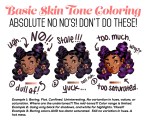
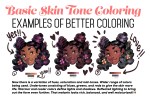
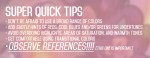
Someone asked for a few tips regarding coloring skin tones so I threw this together real quick lol.
Obviously not an end all, be all — and in NO WAY covers the plethora of info regarding this topic. Just a quick guide from my perspective. One day I’ll make a tut more extensive and organized with way better examples 😭
Ive been thinking about hands lately and really wanted to just focus on them bc i feel my hands look a little lifeless, so i wanted to give them character! 😀
I also wanted to draw what i think Fiddleford’s, Ford’s, and Stan’s hands look like. :0
Ford hands are a little too thin for my likeing, i think he has wider palms (but i totally forgot he had 6 fingers halfway through so i had to make the fingers thinner to cram that extra digit in lol). Stans look aight, I imagine both him and Ford have hair on their knuckles. :3c
(I think the top left beefy hand in the first photo looks better tho lmbo)
Im pretty happy with Fidd’s hand! He’s already a bean pole, and i think he’d have long fingers, and an elogated palm. :>
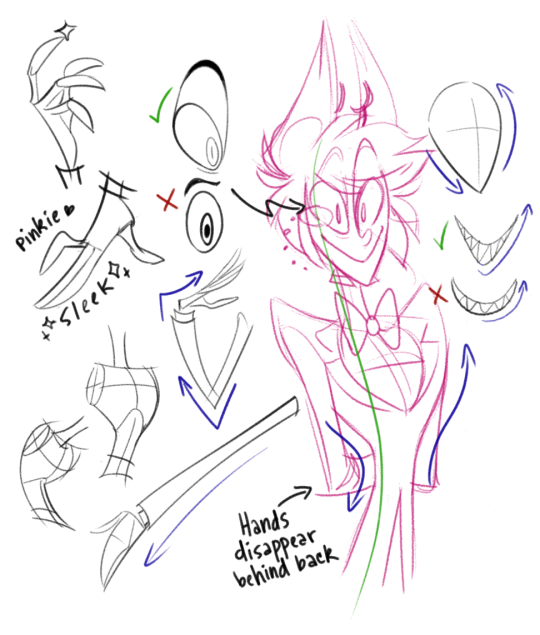
WELL! Allow me to offer you @red-melancholy some really quick, sketchy doodles of what I like to keep in mind when I doodle our totally lovable radio host.
But honestly, my style for Al is constantly changing (something you’ll well likely notice if you happen to have a keen eye) and although I like to stay on model, it’s hard to do so when certain aspects of him vary between pieces/animation sequences.
I just kinda hardcore observe Alastor in everything he’s featured in and go from there! Since my style is pretty flow-driven and cartoon saturated anyway he comes pretty easy to me. Might be harder for others whose style is more anatomy-based, but all it takes is lots of practice and finding a happy medium between your style and the style he’s represented in.
Also we haven’t really seen a proper view of Al from behind so I just kind of turn his hair into a weird… bob cut thing… ¯_(ツ)_/¯
That back view is actually pretty darn accurate! ❤
You don’t always have to draw the harsh light line if you just want a soft scene. You can just use the ‘bounce’as the light source.
You can also transform the harsh light line layer to any layer mode options your art program allows.
Feel free to experiment. Also, it takes time and experience to learn the quantities of line thickness, opacity you want of your light layers. So if you find yourself getting frustrated that your work looks nothing like mine don’t worry you’ll get there 🙂
Yep… So this is what I think might be helpful. Check this tutorial by Sinix [x] it’s super helpful for drawing faces from different angles. Generally, if I can imagine a head in 3D I’m able to draw it and drawing eyes first helps me visualise everything. (It’s super sketchy but hope it’s understandable anyway :))






 Tumblr Blog Backup