
Guy Fieri


uie:
US Helplines:
- Depression Hotline: 1-630-482-9696
- Suicide Hotline: 1-800-784-8433
- LifeLine: 1-800-273-8255
- Trevor Project: 1-866-488-7386
- Sexuality Support: 1-800-246-7743
- Eating Disorders Hotline: 1-847-831-3438
- Rape and Sexual Assault: 1-800-656-4673
- Grief Support: 1-650-321-5272
- Runaway: 1-800-843-5200, 1-800-843-5678, 1-800-621-4000
- Exhale: After Abortion Hotline/Pro-Voice: 1-866-4394253
- Child Abuse: 1-800-422-4453
UK Helplines:
- Samaritans (for any problem): 08457909090 e-mail jo@samaritans.org
- Childline (for anyone under 18 with any problem): 08001111
- Mind infoline (mental health information): 0300 123 3393 e-mail: info@mind.org.uk
- Mind legal advice (for people who need mental-health related legal advice): 0300 466 6463 legal@mind.org.uk
- b-eat eating disorder support: 0845 634 14 14 (only open Mon-Fri 10.30am-8.30pm and Saturday 1pm-4.30pm) e-mail: help@b-eat.co.uk
- b-eat youthline (for under 25’s with eating disorders): 08456347650 (open Mon-Fri 4.30pm – 8.30pm, Saturday 1pm-4.30pm)
- Cruse Bereavement Care: 08444779400 e-mail: helpline@cruse.org.uk
- Frank (information and advice on drugs): 0800776600
- Drinkline: 0800 9178282
- Rape Crisis England & Wales: 0808 802 9999 1(open 2 – 2.30pm 7 – 9.30pm) e-mail info@rapecrisis.org.uk
- Rape Crisis Scotland: 08088 01 03 02 every day, 6pm to midnight
- India Self Harm Hotline: 00 08001006614
- India Suicide Helpline: 022-27546669
- Kids Help Phone (Canada): 1-800-668-6868
FREE 24/7 suicide hotlines:
- Argentina: 54-0223-493-0430
- Australia: 13-11-14
- Austria: 01-713-3374
- Barbados: 429-9999
- Belgium: 106
- Botswana: 391-1270
- Brazil: 21-233-9191
- China: 852-2382-0000
- (Hong Kong: 2389-2222)
- Costa Rica: 606-253-5439
- Croatia: 01-4833-888
- Cyprus: 357-77-77-72-67
- Czech Republic: 222-580-697, 476-701-908
- Denmark: 70-201-201
- Egypt: 762-1602
- Estonia: 6-558-088
- Finland: 040-5032199
- France: 01-45-39-4000
- Germany: 0800-181-0721
- Greece: 1018
- Guatemala: 502-234-1239
- Holland: 0900-0767
- Honduras: 504-237-3623
- Hungary: 06-80-820-111
- Iceland: 44-0-8457-90-90-90
- Israel: 09-8892333
- Italy: 06-705-4444
- Japan: 3-5286-9090
- Latvia: 6722-2922, 2772-2292
- Malaysia: 03-756-8144
- (Singapore: 1-800-221-4444)
- Mexico: 525-510-2550
- Netherlands: 0900-0767
- New Zealand: 4-473-9739
- New Guinea: 675-326-0011
- Nicaragua: 505-268-6171
- Norway: 47-815-33-300
- Philippines: 02-896-9191
- Poland: 52-70-000
- Portugal: 239-72-10-10
- Russia: 8-20-222-82-10
- Spain: 91-459-00-50
- South Africa: 0861-322-322
- South Korea: 2-715-8600
- Sweden: 031-711-2400
- Switzerland: 143
- Taiwan: 0800-788-995
- Thailand: 02-249-9977
- Trinidad and Tobago: 868-645-2800
- Ukraine: 0487-327715
(Source)
ALWAYS REBLOG WHEN YOU SEE SOMETHING LIKE THIS PLEASE; ITS SO MUCH MORE THAN IMPORTANT TO PEOPLE. IT MEANS EVERYTHING TO SOMEBODY AND EVEN THOUGH YOU MIGHT NOT SEE THIS IN THE SAME LIGHT, SOMEONE MIGHT. INFACT YOU REBLOGGING THIS COULD STOP SOMEONE TAKING THEIR LIFE TONIGHT.
Seriously thank you.
I will always reblog this.
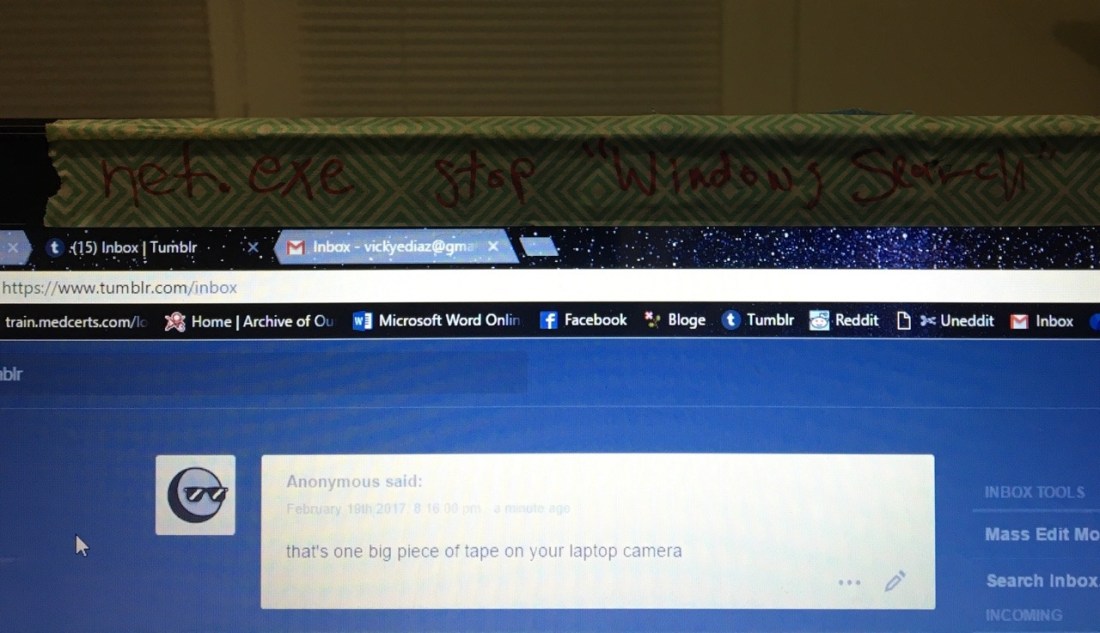
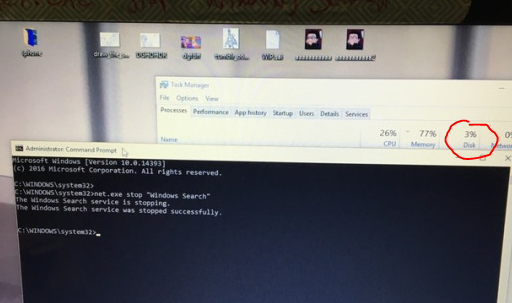
windows 10 is garbage so every time i boot up the computer i have to run command prompt and enter
net.exe stop “Windows Search”
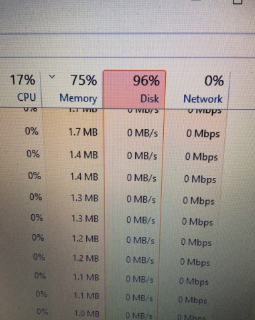
so that the shitty goddamned search/cortana feature that i never fucking use stops running in the background taking up all my fucking disk space
before
after
what the fuck is that seriously what the fuck is making my computer be a fucking piece of shit
@baristaboy try this out dude
y’all didn’t even add a tutorial of how to do this so imma put one right here
1. type in cmd.exe into your windows search and right click on Command Promt search result and select “Run as Administator”.
2. Type/Copypase innet.exe stop “Windows Search” and make sure Windows Search is in quotations. It should then respond saying “The Windows Search service is stopping” and then tell you it’s stopped.
This is only a temp fix though, if you want it switched off permanently then do THIS:
1. Press the Windows key + R at the same time and type in services.msc.
2. Scroll until you find Windows Search and double click it to enter its Properties window.
3. Change the Startup type to Disabled. Apply this change and you can exit out.
VOILA, NO MORE TAKEN UP DISK SPACE
Reblog to save a fucking life, FUCK CORTANA.
Important piece of advice

It doesn’t end there:
another addition
do you ever just like. feel unbelievably proud of someone you’d never even heard of previously
oh my god
Name a better real life character arc






 Tumblr Blog Backup